
The security widget DVLA Reg Check provides an instant view of your printed Registrations legality. This facility uses data from the DVLA Vehicle Enquiry Service API on our LG Plates software. All registration numbers entered on LG Plates are checked to see if they’re valid & on the DVLA database.
DVLA Reg Check Widget
Compatible with on-site printed production, the DVLA Reg Check widget indicates the status of printed registration numbers. A Not-Found status may occur if a vehicle has not yet been entered by a dealership or cleared on RaV yet. As a merchant level tool this widget extracts sync information from all its branch locations.
Video Screengrab
Image Screengrab
Internet connectivity on-site is required for the DVLA API to work as expected.
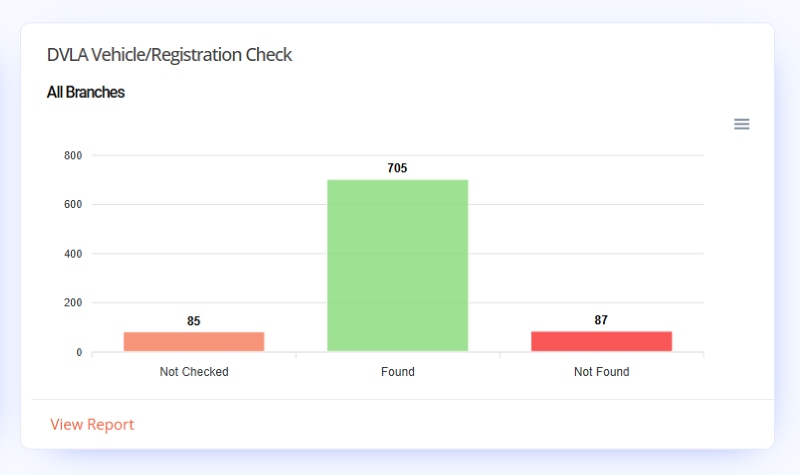
Bar Chart
API data from your plate software’s synced records are used to produce this Bar Chart. The charts bars use the Reg Status values & shows the number with each status for the set duration.
Reg Status Values:
- Not Checked: Internet down or service unavailable
- Found: Registration found on the DVLA database
- Not Found: Incorrect Reg or not on the database yet
Note: The Register a Vehicle service (RaV) can take up to 4 weeks for a vehicle to be cleared & added to the database.
Graph Key
This graph has no chart key due it having just 3 status values and the fact all locations data is used.
Chart Segments & Tooltips
Hovering over each bar on the chart highlights it & provides a tooltip displaying the number that share that status. The image below shows a tooltip for the Found status with 705 registrations included.
Clicking a bar will just darken it for easier viewing, simply re-click the bar again to reset the chart.

Report
At the bottom of the widget is the Report Link. The shortcut links to the DVLA Status Summary Report, which has data on each registration printed during the set duration, its rnps record & the DVLA status. Click it to view the full report page.
