
This is our printed Production Widgets Overview, a guide covering the filtering controls, graphs & sections of Tennants Central’s Dashboard. Use the articles in this Knowledge Base section to find out what the widgets display & how to access the report data they use.
This quick guide was made using a demo version of Central with artificial data, the live website may look slightly different.
Production Widgets Overview
The Production widgets provide a quick overview of your on-site number plate supply. The graphs shown on the widgets allow a quick audit of your number plate supply’s performance, security & waste.
Print data and LG Plates software records from a merchants locations are used to create the graphs. Filtering controls set which location & duration to display results from. If available, the widget links to a report that contains all the relevant data in a table format.
Video Screengrab
Image Screengrab
All synced data linked to a merchant’s locations will be utilised, as will registered user activity.

Dashboard Filters
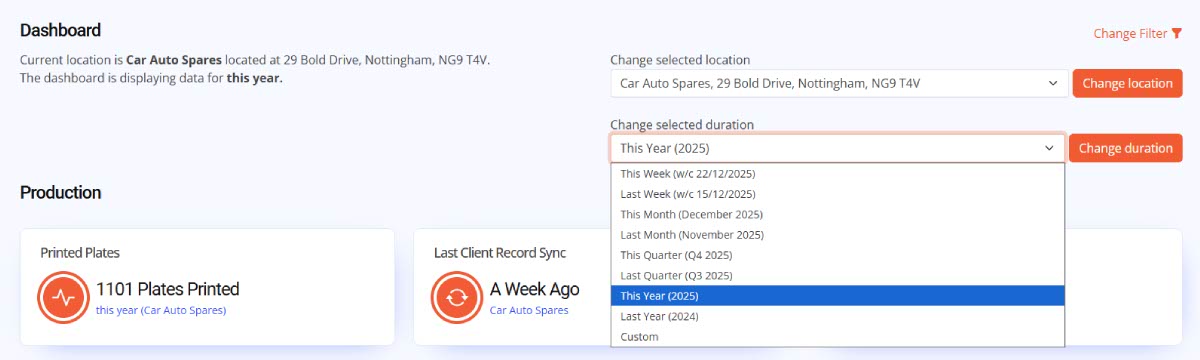
The Change Filter controls are used to choose which location to display results from. All a merchant’s locations are listed, as are a set of durations. The Dashboard indicates which location & duration is active on the top-left of the of the webpage.
Both location and duration can be changed using the on-page filter, using the Change Filter link. On clicking the link, the filters are revealed with options within dropdowns, as shown in the image below. Alter either the location or duration by selecting an alternative option & clicking the Change Button.
The page will reload and refresh the Dashboard page and widgets with data from the new settings.
Summary
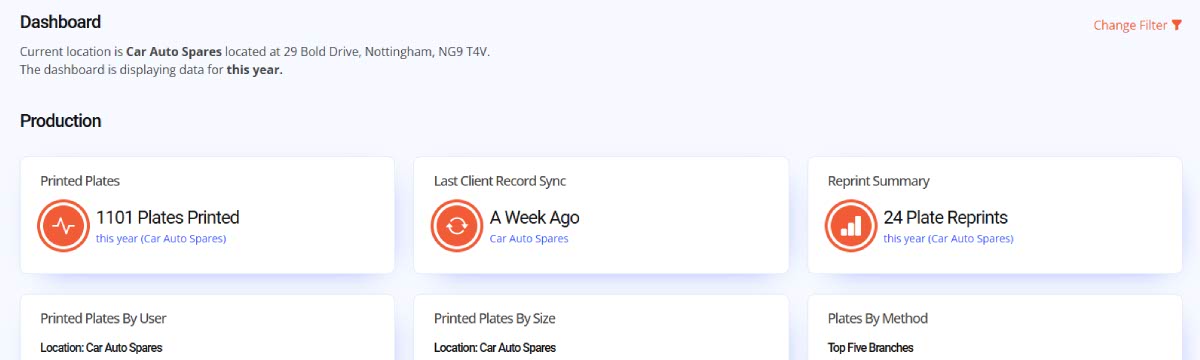
The starting three widgets provide a quick Summary of your number plate production. They act as an overview of the current branch’s print, sync & waste performance. There are no reports or interactions with summary widgets, they display totals as clearly as possible.
First summary shows the total number of plates printed for that duration. The second one displays when that location last synced records to Tennants Central. Third summary has the total Reprints, a simple indicator of costly production wastage.
Production Widgets
Next section has the printed Production Widgets that include links to their reports. These widgets provide a quick audit of your on-site number plate supply. Graphs & charts built using your synced print and RNPS records display on-site performance using a variety of schema like user, location, size & method. The Plates by Method & Orders Dispatched widgets include made-up plate order data for partners with a hybrid supply.
Report links are provided to a summary & detail of the data extracted to create the widget charts. Information is provided in tabular form along with a filter to tweak duration or location.

Security
Two Security Widgets cover all your locations on-site production protection. Last Sync includes timeframe frequency of RNPS Record back-ups and synced print data. DVLA Reg Checks looks at plate legality based on validation status provided by the built-in API in our LG Plate’s software.
Managers can review that their RNPS records are syncing & the software is licenced, and confirm printed registrations are legal & listed on the DVLA database.

Wastage
Wastage provides an overview of production issues using the Reprint Summary to show excess prints by all users for the set duration. The 5 highest scoring users across all locations are shown on a bar chart with their total reprints.
Ideally this widget shows costly waste reprints & may indicate to where more user training is needed. A reprint is recorded by our software when a Registration is printed three times or more. This is adequate for most orders but will catch a pair of plates and a caravan plate.
